


Visual content isn’t the future of content marketing… it’s here now. And Pinterest is currently one of the top social media channels for visual content.
Shareaholic published a study that showed Pinterest as the #2 social media traffic referrer behind only Facebook driving more than 5x as much traffic as many referrers as Twitter.
Pinterest isn’t just for arts & crafts, clothes and recipes. It’s relevant to more niches than most people realize, including niches like real estate and even online marketing.
In fact, the two most shared posts on the Kissmetrics blog get most of their shares from Pinterest. Check it out:
Last year, my e-commerce Pinterest account generated over 1.7 million views and I’m getting close to 10,000 followers. My account is also ranked consistently in the top 2 for the competitive term “baby shower” and my boards and pins are also ranked for other related keywords.
The best part is that I typically only spend just a few minutes a day on Pinterest and it’s kind of fun.
Want to know how to grow your presence on Pinterest? Here are some tips.
The easiest thing you can do to grow your presence on Pinterest is to get into the habit of pinning consistently. While this tip may seem simple, it’s where most people fail with social media marketing.
Pinning consistently will allow you to grow your views and followers over time, similar to how blogging consistently will send you more and more long tail SEO traffic over time.
It also keeps your followers engaged and it only takes a few minutes each day.
My Pinterest account outranks a lot of bigger players including established brands like Huggies. The simple reason I was able to outrank them was because my account has a higher level of engagement since I pin regularly.
A couple of other things:
-If you’ve been reading about Pinterest, then you’ve probably heard that the ideal time to pin is in the evening.
However, ideal pinning times are a distant second concern now that Pinterest has implemented Smart Feed algorithm, which displays pins to users long after they have been pinned.
– Although I try to log into Pinterest each day, there have been periods of several days where I didn’t check it.
It’s okay to miss a day ever so often, but pins can now be scheduled with Buffer. If you want to stay active on Pinterest, there’s really no excuse not to.
Consistency is the key to succeeding with so many things and although it seems like common advice, many people that aren’t successful are failing simply because they aren’t consistent. Identify the barriers that are preventing you from being consistent and eliminate them.
Following other Pinterest users is another tactic that can help you grow your own following.
When you follow someone on Pinterest, by default, Pinterest will send an email notification letting them know that they have a new follower. Some people will follow you back if they find you interesting.
You can view these followers by finding similar pinners and then clicking on their followers tab.
You can also use Pinterest search to find people that have created boards and pins pertaining to your topic of interest. In this example, I search for the term “baby shower food” and then click “boards”:
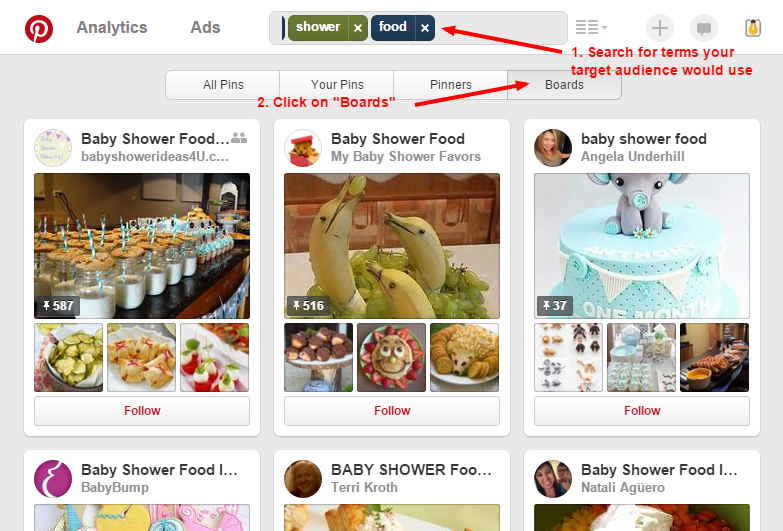
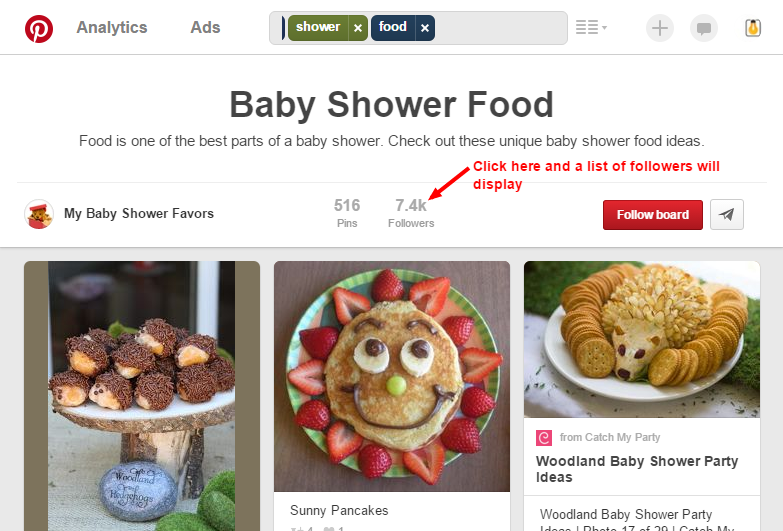
Then I can click on any board that I want to take a closer look at. When viewing the individual board, I can click on “followers” to view the board’s followers and then I can click the “follow” button next to each person I want to follow.
One huge benefit of following a good number of like-minded people is that you can see what visual content is popular in your niche. Finding content to re-pin also becomes easier if you are following other users that pin similar images.
Another important thing you should spend time on is optimizing your boards and pins for Pinterest search. Users can search for boards, pins and other users using Pinterest’s search bar so ranking well for your keywords can be helpful.
If you’ve done SEO, then you’ll be glad to hear that optimizing for Pinterest is much easier than optimizing for Google. It mostly involves keyword research and incorporating those keywords into your boards and pins.
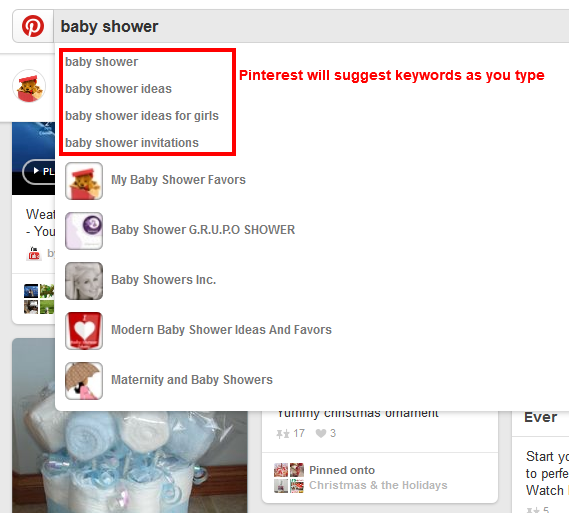
Google Keyword Planner can be a good starting point, but you should also do keyword research on Pinterest. Here are the steps I take:
Pinterest will suggest keywords that other people have searched for. These keywords can be good target keywords to include in your boards and pins.
Do the boards that show up have a lot of followers? Are the other boards that are ranking targeting that keyword phrase?
If the answer is yes to these questions, then you may want to create a board for that keyword phrase.
You don’t have to go crazy over keywords for your pins. Rankings for pins can change daily and most of the search traffic from pins will often come from long tail keywords.
Pinterest tries to keep pins fresh based on what is popular and getting re-pinned and favorited. But you should still try to incorporate some keywords from time to time so that your pins have a chance of coming up for pin searches.
If people are pinning images from your boards, then Pinterest will rank those boards higher. You don’t have to add new pins to every board every day, but try to pin new images to boards regularly.
One common mistake that people make on Pinterest is only pinning their own stuff. Be sure to take the time to follow other pinners and pin images from other people that your audience might be interested in.
Identify your target audience and focus on creating a useful resource for them by creating boards that they will find interesting. Update those boards with regular content.
Taking this approach will allow you to grow your Pinterest following faster than if you only pin your own stuff.
Be sure to also pay attention to seasonality and trends. If you are active on Pinterest regularly, you may notice people pinning different images based on trends and seasons.
For example, when Halloween approaches, people in the party-planning niche will start pinning Halloween related images.
When I first noticed this trend, I created a Halloween board and started pinning Halloween related recipes and images to it.
You can view your analytics by going to the Pinterest analytics tool or by clicking on the “Analytics” link on the top left in the header area. Here’s a screenshot of the traffic increase to my Pinterest account after I started my Halloween board in 2014:
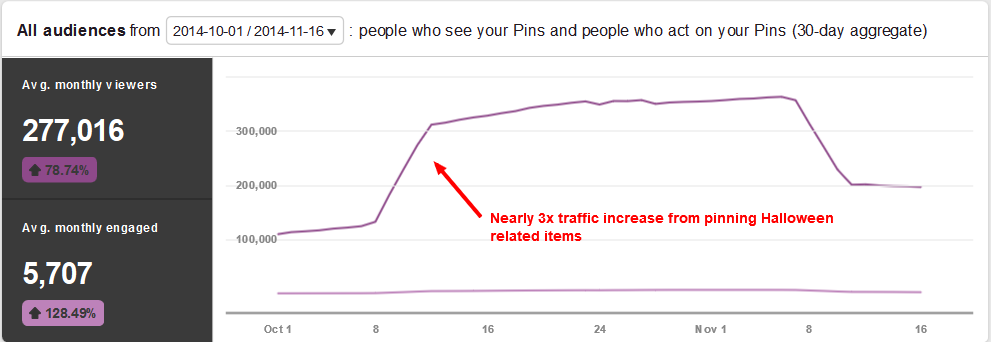
I noticed that my other competitors didn’t change their pinning activity during the holidays. Don’t make that mistake!
To sum it up, Pinterest is an important social media channel and being active on it consistently is key to growing your Pinterest views and followers, even if it is just a few minutes a day.
Connect with other like-minded users, do your keyword research and pay attention to trends and seasonality. And most importantly, focus on creating a useful resource for your followers.
E-commerce isn’t something I focused on heavily in 2015, but in the future, it makes sense to create more visual content on my e-commerce blog so that more of the traffic from Pinterest will end up going to my website.
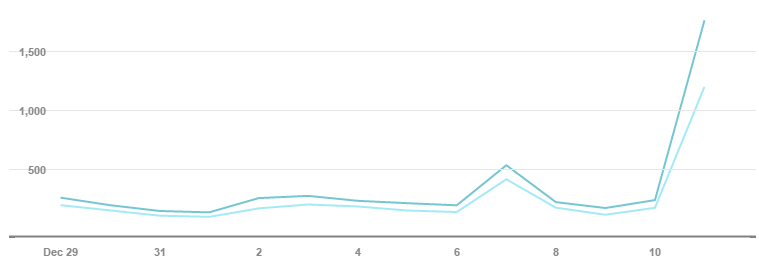
I’ve spent much less time on my Pinterest account for Small Business Ideas Blog, but I noticed an uptick in traffic to my account from infographics getting pinned by other Pinterest users.
Here’s a screenshot of my Pinterest analytics for that account:
So what do you think? Is Pinterest an important part of your marketing plan?
About the Author: Brian Lang is the founder of Small Business Ideas Blog, where he shares tips and ideas for business and marketing. Feel free to download his free resource, 50+ Free Tools to Market Your Business and read his content marketing guide.


Email inboxes are noisy–and are even more competitive than you might think. The average email user has an inbox made up of about 50% newsletters and 20% social network updates according to Microsoft.
So when a you’re working to stand out from the raucous crowd that’s competing for a user’s attention within the inbox environment, it’s no longer enough to send one-size-fits-all email messages—you need the one-two punch of sending the right personalized message at the right time.
That means harnessing the power of two different features within email: Personalization and automation. Here are some practical tips for getting started.
Many businesses and organizations have fallen into the habit of sending mass emails that don’t utilize personalization (like including the recipient’s first name in the subject line.)
But Experian recently reported that implementing this minor change had a dramatic effect on open rates:

Across almost every industry studied, including the recipient’s name in the email subject line increased open rates–some by as much as 42%. Other research echoed the success of using a recipient’s first name in the subject line, reporting that emails with personalized subject lines are 26% more likely to be opened.
The shocking part is that researchers also found only 35% of marketers are leveraging personalized subject lines.
So, what gives? Is personalizing a subject line confusing? It’s actually pretty simple. As long as you’ve collected a first name from those who opt-in to your email list, personalization takes seconds. Most email providers (like Campaign Monitor, MailChimp, AWeber, etc.) enable you to insert a recipient’s first name by inserting a custom field into the subject line.
For example: If you were using Campaign Monitor and wanted to personalize your subject line, you’d use [firstname, fallback=] as pictured below:

And that’s it. With this simple step, every email recipient will see his/her name appear within the subject line, like in this example from Ipsy:

You can also use this same format to include the recipient's first name within the message body, which ups the personalization just a little bit more, as seen in this email from Poshmark:

By simply enabling an existing feature on your email platform, you can boost open rates–which is the first step toward increased conversions.
The realm of email personalization extends beyond the subject line, too. Aside from having a human element, personalized messages are also highly relevant for recipients–which is a major pain point for about three-fourths of email account owners. Research shows that as many as 74% of online consumers are frustrated by messages that aren’t relevant and don’t fit their interests, which can happen as a side effect of unsegmented email lists that help categorize subscribers.
Along with relevancy, segmented lists also have a slew of other positive effects for email marketing. The DMA reported that segmented at targeted emails generate 58% of all revenue, and that some markets have noted a 760% increase in revenue from segmented campaigns.
And then there’s data from the Lyris Annual Email Optimizer Report:

The report shows that segmentation also helps boost open rates, drives conversions, and overall increases the quality of communication–making for successful emails that feel tailor-made for each unique recipient.
So how do you go about segmenting your lists?
Every business has different objectives for their email marketing campaigns, but think about the ways in which you currently use email messaging, and how you’d ideally like to use it in the future. From here, you can start to break down a mass list into smaller, more relevant lists and map out your plan for segmentation.
Think about sorting contacts by:
These are just a few ideas to get your mental wheels turning, but think about how you can break down an existing list into more specific categories. Moving forward, you can then enable user-selected sorting capabilities (like the ability to opt-in to different segments of your list for specific types of communication.)
Need more inspiration? See how BuzzFeed uses email segmentation.
Next, it’s time to start segmenting your list within your email platform. Some email platforms (again, we’ll use Campaign Monitor as an example) will allow you to build segments based on rules and parameters you set.
Here’s what it looks like to build different segments on their platform:
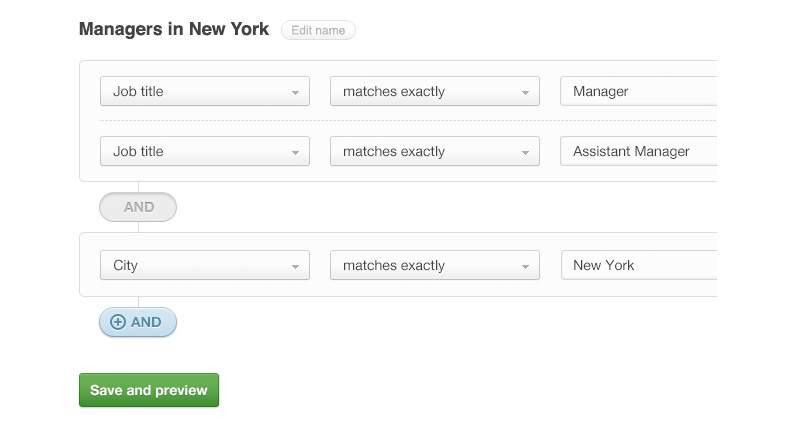
In the example, you can see how you could build out a specific segment that includes managers in New York via parameters that require the title of Manager or Assistant Manage who reside/work in New York.
You can create as few or as many different segments as you like, but each new segment should have a conversion-oriented purpose.
Note: If you want to create detailed segments, you’ll need to collect more detailed information from subscribers during opt-in. Add a few extra fields (like job title, address, etc.) that go beyond name and email address to get the data you need in order to properly segment.
Once you’ve created your various segments, you can begin launching more specific email campaigns that align with the interests of your various lists.
Here’s an example of what that might look like: Imagine you own a retail business that specializes in outdoor sporting equipment. Rather than sending one-size-fits all emails that promote all of your products to a single list, you create segments based around promoting specific types of equipment (like fishing gear, baseball equipment, etc.)

Through website opt-ins and online purchase tracking, you can now send highly relevant information about your specific products to people who’ve are most likely to be interested in that information.
Now that you know how to leverage personalization and segmentation to send the right message to the right email subscribers, let’s look at how you can use automation to send those messages at exactly the right times.
Automated emails enable you to communicate with the right person with the right message at the right time (without having to keep track of each subscriber one by one.)
And they’re proven to be successful tools for boosting conversions, too. Experian research found that automated transactional emails have 8x more opens and clicks than any other type of email–and they can generate 6x more revenue. And along with the pure convenience factor it offers, email automation is proven to drive conversion rates by as much as 50% for B2C marketers.
Because of this, more and more companies are hopping on board with automation: it’s used by 82% of B2B and B2C companies, and revenue for marketing automation systems increased by 60% in 2014.
So how can you use email automation?
Many email marketing platforms already have automation features built in (although more often than not, they’re a paid feature.)
Automated emails can:
You can have multiple workflows running at the same time, so think about what different objectives you can accomplish within different series.
You can set up email automation for a variety of purposes, but let’s look at what it would look like using MailChimp:
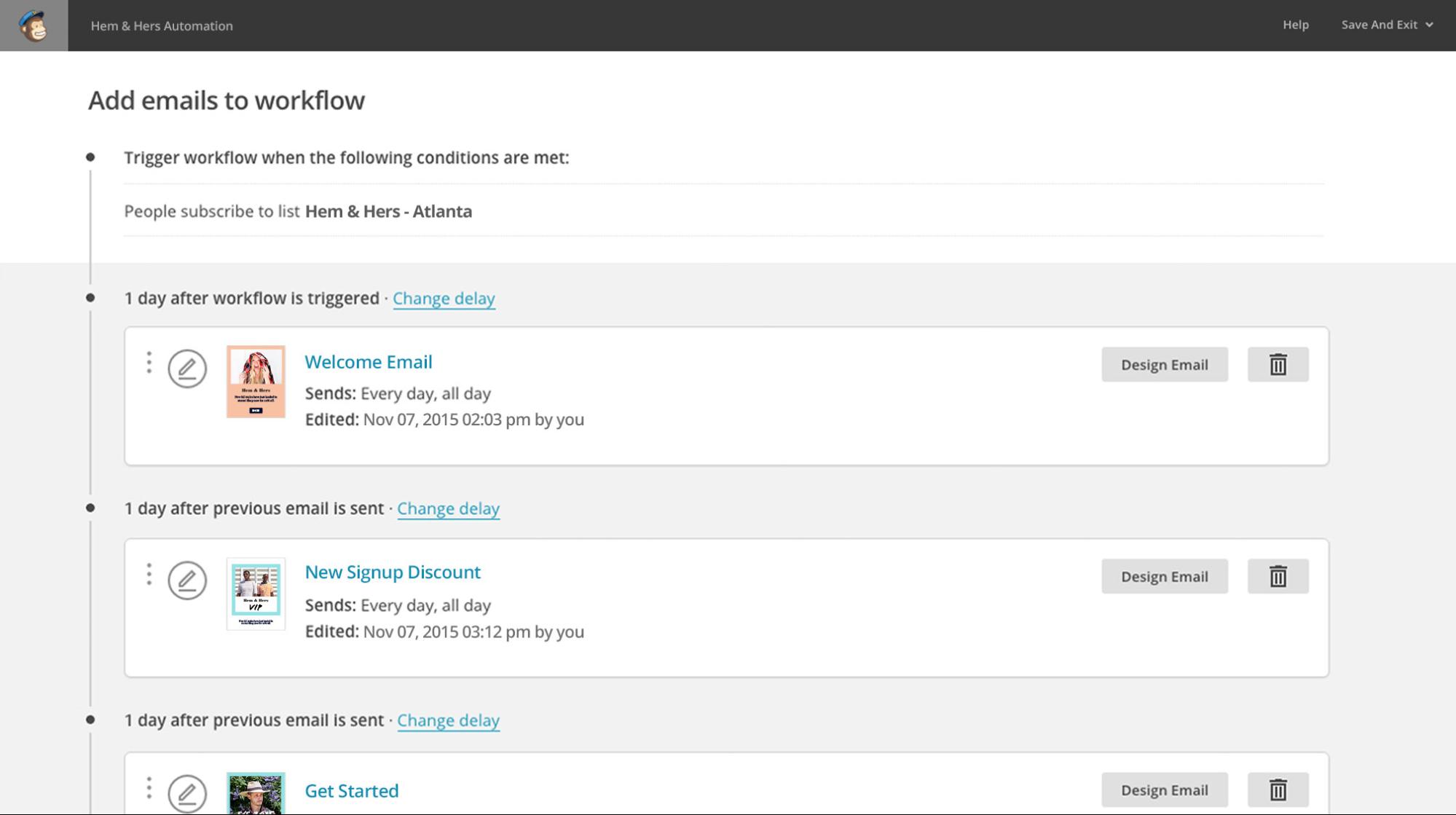
Using MailChimp, you can set up a workflow that triggers based on an action you select. In this example, the workflow is triggered when someone subscribes to a specific email list, but other triggers might be:
From there, you’ll launch an email sequence that drives the recipient through a series of emails that all work together toward a conversion (like an item purchase.)
Next, put together a series of 3-8 (or more, if you want) that keep the conversation with your subscriber going. In the example, you’ll see that in the example, they’ve created:
All of these messages help you stay in touch with the customer while encouraging them to take further action or to re-engage with you.
In your workflow, you can do things like:
The goal of these on-going message series is for you to keep reminding your customer of the value you can provide and to keep your brand top-of-mind–so think about what you need to say to accomplish that.
Need more on this part? Read more on outbound email automation tactics here.
Once your email series is ready, you’ll want to map out when these messages will send, and which recipients will receive them. Space out your messages so that they are not overwhelming, but on a timetable that maintains relevancy.

In the example, you’ll see how MailChimp lets you determine when automated messages will send and which segments will receive messages. You’ll want to test different send times to see which pattern is most effective for your audience.
Emails that send automatically after a customer completes an action are also part of your automated email strategy–so make sure you are optimizing them with clever copy and smart design. Studies show that messages about order confirmation and shipping confirmation have some of the highest open rates of all.

Many of these types of messages only include a standard message with order details, but with such high open rates, you should put these automated messages to work, too.
One of the beloved examples of a solid transactional email is this shipping confirmation email from CDBaby, which says:

See how fun that is? Rather than just saying, “Thanks for your order” this email puts an interesting, lovable spin on what might be an otherwise boring message. Write copy that makes your message memorable for readers.
Once your workflows go live, keep an eye on metrics like open rate and click-through rate to see how effective your automated campaigns are–and monitor how your conversion rate improves.
Just remember: Automation doesn’t mean set-it-and-forget it. You need to constantly make tweaks and improve based on subscriber feedback and A/B testing–just like with any other email you’d send.
The final question in this equation, then, is: What email platforms can I use to harness the power of both personalization and automation? Here’s a brief summary of a few options–but there are many, many more you can look into as well.
Campaign Monitor
This platform has a whole gallery of mobile-friendly templates you can customize, as well as lots of helpful resources for all aspects of email marketing. Thanks to built-in metrics and multiple integrations, you can study campaign success and make email marketing a seamless part of your operation.
Price: $9-49/month
Hubspot
Hubspot offers a full-service solution for marketers with everything from email, to CRM, to social media management, and more. If you’re looking for a one-stop-shop for all of your online marketing efforts, this is powerful option with a training system built right in.
Price: $200-2,400/month
MailChimp
Using MailChimp, you can take full advantage of a variety of different email tools, like A/B testing, automation, and more. Create custom templates or use their free options to build and send customized emails. Here you’ll find lots of teaching resources, helpful integrations, mobile-friendly designs, and advanced metrics for studying the success of your campaigns.
Price: $25 and up, based on number of subscribers
AWeber
AWeber prides itself on its integration with other apps, its suite of advanced tools, and self-hosted opt-in forms. Again, tons of free guides to help you get started and webinars that enable you to get the most out of this platform.
Price: $19 and up, based on number of subscribers
Constant Contact
One of the long-standing figures in the email marketing industry, this platform touts ease of use. Here, you can take advantage of templates, learn how to improve email marketing efforts, and get access to 24/7 support.
Price: $20 and up, based on number of subscribers
Again, these five options are just the tip of the iceberg when it comes to your options for sending email, so look around and see which interface and tools best fit your needs. The bottom line is that you need to find an email marketing service that works with your budget and covers all of your needs for both personalization and automation.
The numbers don’t lie–a combination of personalized email marketing and automated messaging are a surefire way for you to increase the success of your campaigns. Follow the steps for personalizing email, segment your lists, and put automated and triggered emails to work for your business.
About the Author: Kaleigh Moore is a social media consultant and copywriter who helps SaaS companies craft intelligent content with a charming human element. Visit her website or follow her on Twitter.


Picture this: You've just been hired as the marketing head for a promising startup. Your job is to help the company build awareness and find users.
Where do you start? Certainly, you know that getting off on the wrong foot can have disastrous consequences. Bad hires and processes not only hurt the company, they also make you look bad and can destroy your credibility and trust within the company.
On the other hand, if everything goes smoothly from the start (barring some inconsequential missteps), you'll know that you helped the company grow and played an important role in its success.
How do you know where to begin, and what mistakes should you avoid?
These are the challenges that Tamara Mendelsohn faced when she joined Eventbrite in 2009. Mendelsohn built the Eventbrite marketing team from the ground up, to a team of 60.
And the company has turned into a pretty big success, hosting over 1 million events per year and processing over 4 million tickets.
Mendelsohn and her team deserve a lot of the credit for helping establish Eventbrite. They grew awareness of the company, helped it reach new user groups, and built a solid marketing team.
Mendelsohn learned a lot of lessons along the way, and she shared what she learned at True University. This blog post is a recap of her presentation.
Mendelsohn broke her presentation into three sections:
Each section is chock full of good advice. Let's get into it.
These are the lessons Mendelsohn learned in the first year at Eventbrite. They are the foundational pieces you have to get right.
At the time, Eventbrite had thousands of customers. Because of the self-service nature of the business, they didn't have a sales team. When Mendelsohn joined the company, she launched the blog. Unfortunately, she didn't know much about events or event management. So she emailed customers who had used Eventbrite to run events, and she interviewed those customers and posted the interviews on the blog.

The value in these interviews was not just blog content, but also being able to talk to and understand customers.
Mendelsohn says that hearing from customers helps shine light into areas you may not think of regarding your brand, messaging, and positioning.
After talking to a lot of customers, Mendelsohn created a list of all the reasons people were using Eventbrite.
There were about 20 different reasons. Here are just a few:

From there, Mendelsohn sent out a survey to users. She kept it short and sweet, limiting it to three questions. This was the first question:
From there, she cut the data with this second question:
And this was the final question:
She got two takeaways from this – the perceived benefit and the realized benefit.
Then Mendelsohn created a series of paid search campaigns that paired a perceived benefit in the headline with a realized benefit in the text underneath. There were a lot of different combinations to test. She took the top three perceived and realized benefits and then created dozens of ads based on the different combinations. So, for example, the #1 perceived benefit could be paired with the #2 realized benefit. And the #3 perceived benefit could be paired with the #1 realized benefit. All these different ads were then tested against each other.
She found a big winner, which was this:
Headline: All in One Solution
Text: That lets you get access to your money quickly
This process can give you a place to start. (In the case of Eventbrite, their positioning and messaging have evolved a lot over time.) At the very least, this gives you a starting point for your messaging, and you'll know you have something that gets people to click on an ad.
Once Eventbrite raised their venture capital, the team sat down and asked themselves some introspective questions:
This was the beginning of their “brand and culture” discussion. Mendelsohn thinks that brand and culture go hand in hand, and she uses the terms interchangeably. She says:
Your employees and the culture of your business will make its way into your brand whether you like it or not, and vice versa.
There are two important exercises for building your culture and brand. We'll start with the “why” question.
Mendelsohn recommends starting with one question:
Why?
She recommends viewing this TED Talk from Simon Sinek (and watching it again if you've already seen it). It has been so influential, in fact, that Mendelsohn watches it every couple of months just to remind herself of the importance of answering the “why” question.
Mendelsohn expounds on the reason the question is so important:
If you want to create a brand that people have an emotional connection with, that outperforms the market, outperforms the competition, and outperforms your expectations because people feel an emotional connection to it, the heart of creating [such] a brand…is the answer to this question: Why do you exist? What is your authentic reason for being?
In addition to watching the TED Talk and answering the “why” question, Mendelsohn also recommends reading this AdAge article.

Understanding the reason for your existence will be the core of all your marketing and messaging, and it will make its way into your culture and your customer experience.
Airbnb is the quintessential example of this. They make it clear: It's not just about renting a room, it's about a feeling of belonging, and belonging anywhere. And when you travel, you don't have to feel like a stranger.

Their ad campaign made this clear as well:
That is what they stand for, and that is why they exist.
If you can develop a relationship with your customers, that will translate into loyalty. And loyalty translates into higher lifetime value, greater word of mouth, and all the great things that come along with sustainable business metrics.
After poking around and doing some brainstorming, Eventbrite came up with this:

At its core, this is what Eventbrite is about. This was what they sold investors on in their first pitch deck. Even as technology advances and people spend more of their time in front of screens, the power and importance of connecting in person, with real people, remains. Humans will always want to learn together, grow together, and celebrate together. That will never go away. That's Eventbrite's pitch. If they can help bring the world together around live experiences, then ultimately they're doing some good.
So that takes care of the “why” question. The second exercise for building your culture and brand is the “brand tenets” question.
In that very first customer survey (that Mendelsohn created after talking to customers), if a person answered that they loved Eventbrite and would recommend it to a friend, they were asked an additional question: What are the words you think represent Eventbrite?
They got a huge list of words.
Then they did a similar exercise with the executive team, asking them what Eventbrite stands for, what are the company’s principles, and what do they want to build?
Once Mendelsohn got answers from both customers and executives, she put the lists of words up against each other, and there was a lot of overlap between what the customers said and what the executives said.
To put it another way, instead of deciding what they wanted to be and forcing that on customers, Eventbrite went to users and asked them what they thought Eventbrite was. Then they asked themselves the same question, and finally they found the marriage between the two sets of responses.
This gave them the list of brand tenets. This may change over time as the brand changes with the business. For example, an early word for Eventbrite was disruptive. They wanted to disrupt the industry and get people's attention. But once they got that, they felt they didn't need to keep disrupting.
You may want to look at your tenets a year or two down the road to see if they still match who you are.
Over time, as Eventbrite grew, they realized that it wasn't just marketing that owned the brand voice. There were sales people and product people writing copy. People outside of marketing were talking to users. Because they needed to speak with one brand voice consistently, Eventbrite created the voice and tone guide.
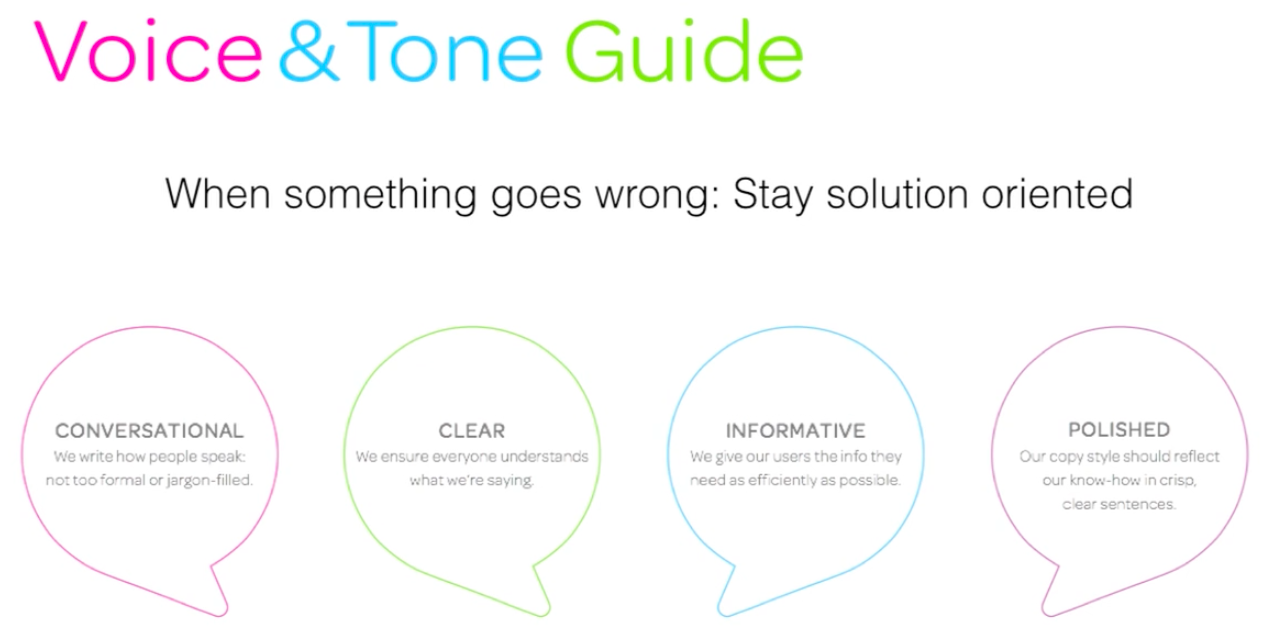
When doing this, you don't need to create a huge manifesto. Just some easy to remember guiding points. Note that the above screenshot is not their entire guide.
How do you build on this foundation and drive growth?
It is important to maintain focus on 1-2 metrics. The metric(s) will change over the life of the company. In the early days, you may choose an acquisition-driven metric, and, later, you may focus on a retention-driven metric.
Once you know your metric, you can define the funnel to get to that metric.
You need to define each stage of the funnel and measure it appropriately. Look at it at least every week to see your progress.
Eventbrite’s funnel had these steps:
– Visited signup page
– Signed up
This conversion rate was important. They dug deeper into the next steps:
– Signed Up
– Saved Event
– Published Event
– Sending out invitations
Once you have your funnel reporting, you can break down the data and decide where you want to optimize. Is there an area that's doing well that you think can do better? Or do you want to improve an underperforming step?
It's also important to find the people that dropped off in the funnel. Send them a survey and ask them why. You may think they won't respond, but people actually do. Getting this qualitative feedback from people will uncover insights you haven't previously thought of.
The Eventbrite funnel became so important that Mendelsohn hired a full-time person whose only job was to optimize their funnel. This person is the equivalent of what is now known as a growth hacker.
This was her third hire. Her first was a designer and second was someone to work on all their channels – social media, the blog, etc.
This was Mendelsohn's job in her first couple of years. Her MO was this: Figure something out, and then hire someone better to do it.
When Mendelsohn was running channels, she used data to figure out what worked (social was a big driver of growth) and put more horsepower (resources) behind it.
Here's what she discovered (your results will vary, of course):
– Display was unsuccessful for the first couple of years, but retargeting worked. It's important to experiment with retargeting – test your messaging, who you retarget, where you retarget them, etc. Mendelsohn retargeted people who visited the press page. Why? Because these people were either journalists or people looking for a job. Suddenly, these people were seeing the Eventbrite brand everywhere. These are low-cost things that are not directly for acquisition, but they make the brand appear bigger than it really is. Here are some more tips for retargeting users.
– PR was brought in-house after about 6 months. Having a PR person working only for Eventbrite helped them create much more creative PR ideas than an agency ever did.
You'll need a good analytics tool for measuring all these channels. You need to know what you want from the start, and you'll need a tool that's flexible enough to fit your needs as you grow.
As your company grows, you'll want to look at your marketing campaigns from three perspectives – paid, earned, and owned media.

Mendelsohn explains:
You don't just launch a campaign in one channel, because you won't get the maximum benefit from it. So when you're thinking of reaching an audience with a specific message, [think about] how [you'll] create campaigns that have this 360 degree view [and] think about each of those. So, what is the content you're creating (that's owned media), then how will you amplify that through paid channels…and then how do you get the stage where it's earned? And that's when your customers are sharing things, press is picking things up….if you get those three (paid, earned, owned) to work together, [then] that's the golden triumvirate because you're getting so much more value for the initial work that you do.
At some point during your growth, you'll want to coordinate your marketing campaigns around those three buckets and how you can get them to work together.
Mendelsohn is a big believer in content marketing. She saw it work at Forrester Research and took what she learned to Eventbrite.
Here's the blog post that started it all:

When Mendelsohn was an analyst at Forrester, she understood that people wanted to know how social media impacted commerce. However, no one at the time knew the answer, except Eventbrite. When she got to Eventbrite, she connected the dots and released the report.
This was the first time they got all three buckets working – they put out some paid advertising for this report, the press picked it up (even Zuckerberg mentioned it in a press conference), and people shared it across their social network. It was one idea and one answer to a question that drove a ton of traffic and signups for Eventbrite.
As Eventbrite breaks into new verticals, they need to reach new audiences and gain credibility. The way they approach this is to listen to these specific user groups. Figure out what they're talking about, what questions Eventbrite has, and then get answers to those questions.
One user group they discovered was the Electronic Dance Music (EDM) subset. There wasn't anyone dominating this event market, which presented a big opportunity for Eventbrite. They went and talked to the promoters of EDM. The promoters didn't know who the fans were, but they wanted to know, and they wanted more of them.
Eventbrite then worked with a company called Mashwork to gather social data on what EDM fans were talking about. All the data led to this popular infographic:

They also published a report showing the differences between EDM fans and traditional music fans:

This led to an explosion of coverage. Eventbrite competitors covered it, and Billboard magazine wrote about it. Ticketmaster, a competitor to Eventbrite, mentioned the data in their analyst calls.
Mendelsohn says that content has been the best way for Eventbrite to break in to a new domain. They don't force their way into the conversation. Instead, it's organic, relevant, and people are willing to embrace them.
This content approach doesn't always work for Eventbrite. They've had a few that have flopped, and it's usually a result of picking the wrong topic and not doing enough research.
Mendelsohn's strategy for building a team was simple – what deserves investment, find the best person to do it, and then move on.
Early on, Mendelsohn hired people who were young, not very experienced, but really hungry to learn and really curious. After a couple of years passed, she began hiring more experienced people as she realized that the young people had reached their capacity for growth and she didn’t have the time or the knowledge to help each one.
To put it another way, her formula was this:
Start with a rock star, hungry team of junior folks and then over time, start layering in more experienced people to help the juniors continue to grow. Today, her direct reports have a minimum of 15 years of experience.
Not every company is the same. Some of what worked for Mendelsohn won't work for you.
Does your first hire have to be a designer? No, not unless you have that need.
But there are some key lessons to learn. Never underestimate how important it is to learn about your customers. After all, these are the people you are targeting. You need to know about them and how to get more of them. And always do your research before you enter new user groups. Content may not be the best way for you, but whatever you do, you’ll want to make sure your name gets out there in a respectful and organic way that users are receptive to.
Here are some other key takeaways:
About the Author: Zach Bulygo (Twitter) is the Blog Manager for Kissmetrics.


